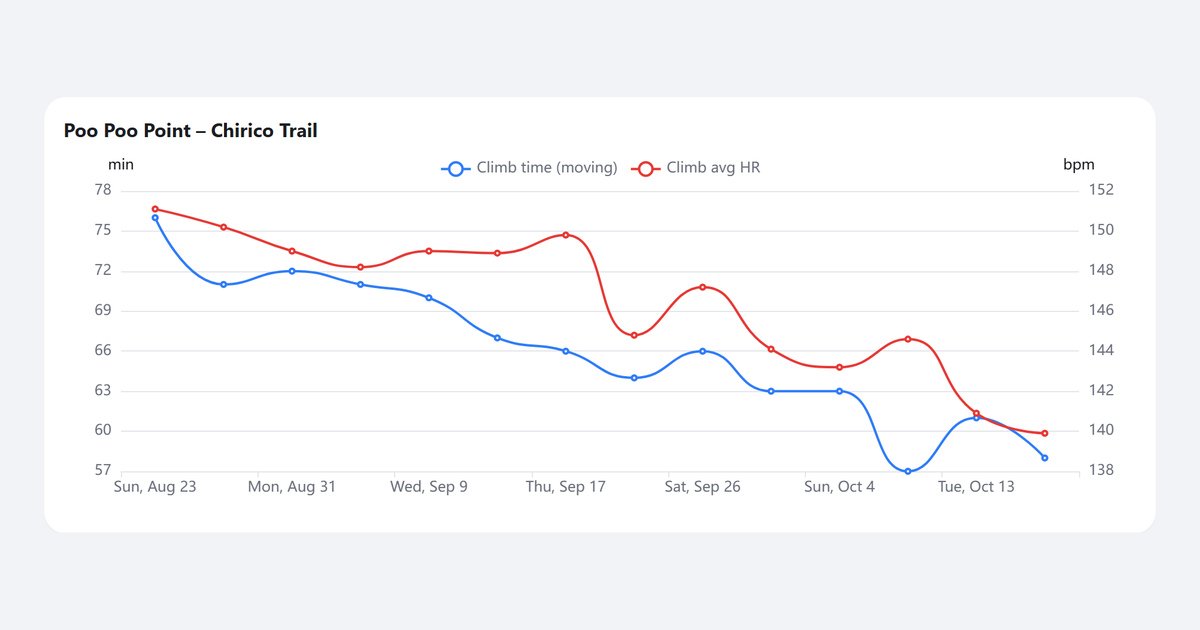
In late August I started hiking Poo Poo Point near Issaquah: about 3.8 miles round trip and roughly 1,760 feet of climbing, up to the meadow where paragliders launch over the valley. It became my regular hike, which raised the question every regular hiker asks: am I actually getting fitter?
The screenshots in this post use sample data, not my own. This post is about the app, not my heart.
The screenshot loop
My Samsung Galaxy Watch recorded every hike in Samsung Health. But the app shows each workout on its own. It doesn’t compare this week’s climb with last month’s, it lumps the hard climb and the easy descent into one average, and every hike is just “Hiking” and a date.
So I took screenshots of the charts and pasted them into Claude. Was that a good hike? Was my heart rate too high on the climb? Am I improving? It worked, up to a point. Every question started with more screenshots, and I kept losing track of what I’d already uploaded and which chat it was in.
The irony wasn’t lost on me. I’ve spent my career building the systems that tell Azure, and its customers, whether things are healthy, with no human copying numbers around. And here I was monitoring my own heart by hand. So I built the pipeline I’d want at work: collect the data automatically, keep all of it, process it the same way every time, and let me ask questions of it.
What TrailPulse does
- Syncs on its own. A small phone app sends new workouts from Samsung Health to a computer at home every few hours.
- Breaks each hike apart. It finds the summit and splits the hike into the climb, the rest at the top and the descent, each with its own time, elevation and heart rate.
- Tracks progress on each trail. It recognizes the trail and puts every visit side by side, so I can see whether the same climb is getting faster or easier on my heart.
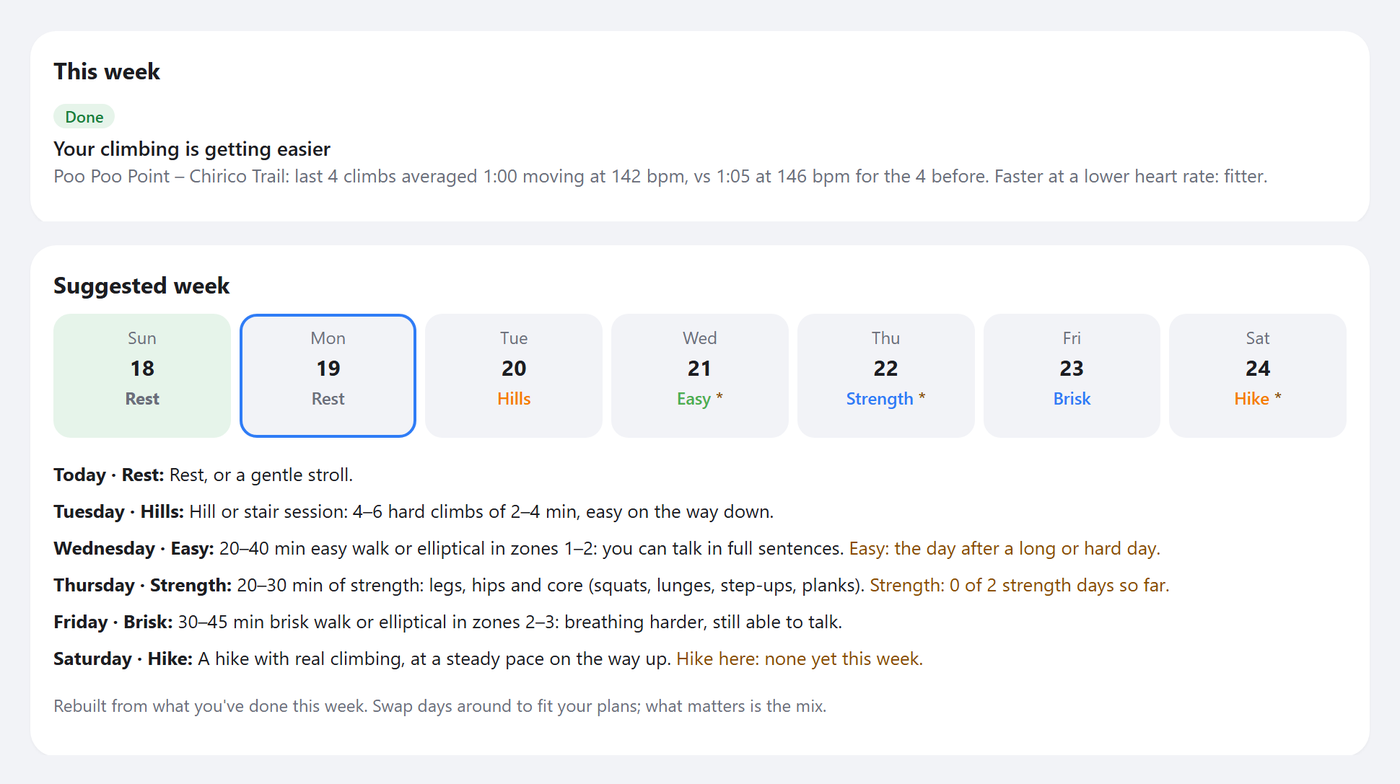
- Suggests what to do next. A weekly plan turns my numbers into suggestions, with recovery first.
- Answers questions. I can ask Claude “How was today’s hike?” or “Am I getting fitter on Poo Poo Point?” and get an answer from my real data. No screenshots.
Just as important is what it doesn’t do. There’s no subscription or monthly cost: it runs on a computer I already own. There are no ads or trackers. And my data stays on my own computer, not in someone else’s cloud.
The chart at the top of this post is the question I used to answer with screenshots: the climb time and average heart rate on every visit to one trail. Here is a single hike, split into the climb, the top and the descent, where Samsung Health shows one average:
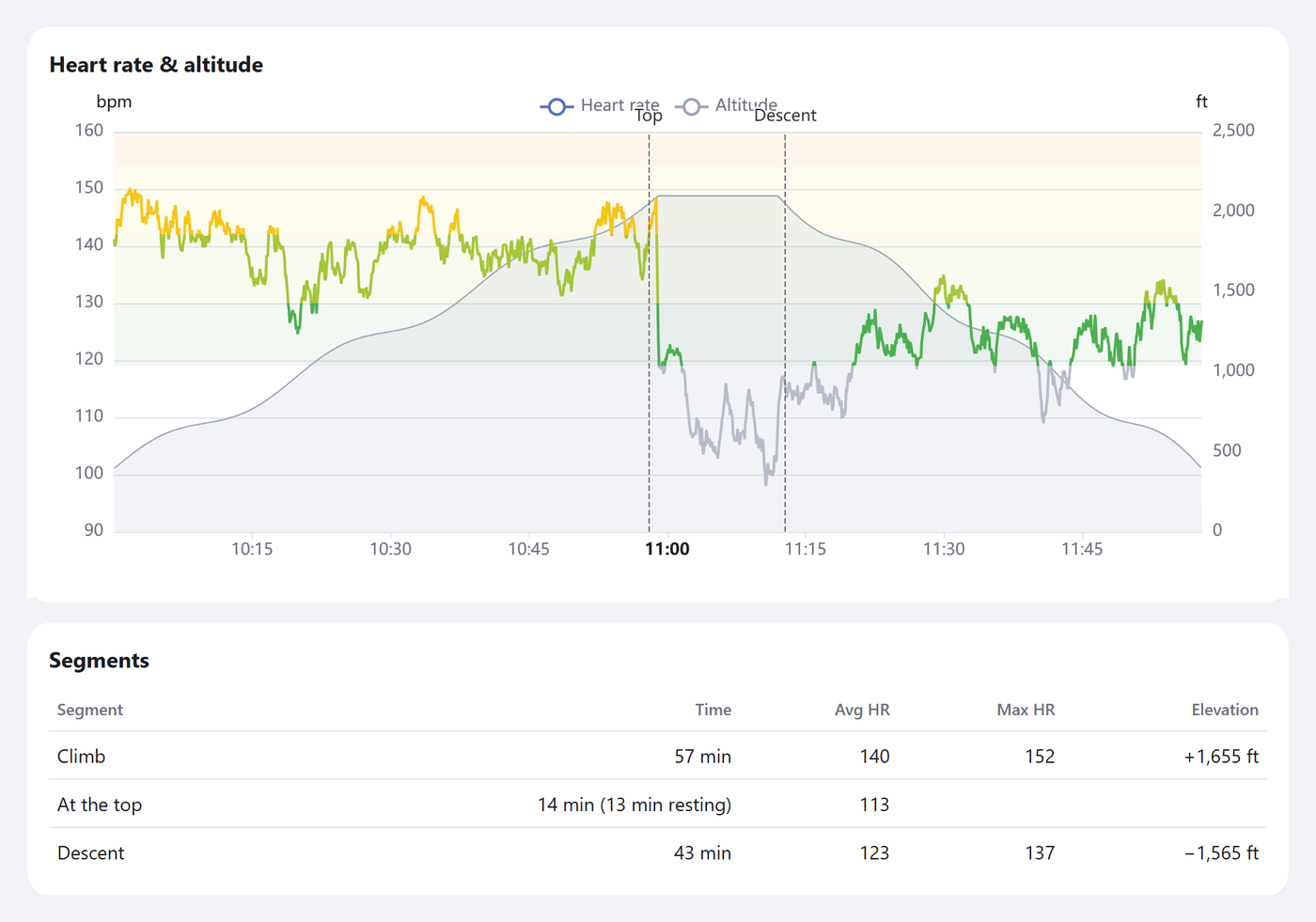
And here is the plan. It notices when the climbing is getting easier, then builds a suggested week around what I’ve already done:
How it works
Galaxy Watch → Samsung Health (phone)
                    │
             TrailPulse phone app
                    │  encrypted, over my private Tailscale network
                    ▼
           Home computer: TrailPulse server
           ├─ stores every raw reading (SQLite)
           ├─ processing: trails, climb/descent, heart rate zones
           ├─ dashboard I open on my phone
           └─ read-only connector ◄── Claude
Private by default. Health data is personal, so nothing goes to the cloud. The phone talks only to my home computer over Tailscale, and the server can’t be reached from the internet. Claude reads the data through a read-only connector (MCP), only when I ask a question, and never sees my GPS tracks. That bar even caught Samsung’s own developer kit, which has a hidden app store check that sends details about the phone. The app now runs its own checks first so that call never fires.
Keep the raw data forever. Every reading is stored exactly as it arrived, and everything on the dashboard can be rebuilt from it. When I improve a rule, all my past hikes are reprocessed.
Building it with Claude
I didn’t start with code. I wrote a brief: what I wanted to learn about my heart health, the privacy rules that couldn’t be broken and a set of milestones. Then Claude Code did the coding.
My job was the part I’ve always done as an engineering leader: set the direction, test the experience and make the calls. I tried each feature on my phone after a hike. Claude suggested improvements as it went, and I accepted or adjusted them. Each significant decision got a short written record of what we found and why we chose what we did.
What still surprises me is the speed. A phone app, a server, a data pipeline, a dashboard and a Claude connector would have taken days or weeks, if not months. The initial working version took less than a day to build.
What I learned
My assumptions were wrong on day one. The brief assumed Samsung’s developer kit would give me resting heart rate. It doesn’t, and neither does Health Connect. Because the first milestone was a small test app that checked every assumption against real data, we found out on the first day, not weeks in. TrailPulse now works out resting heart rate from daytime readings, within a couple of beats per minute of Samsung’s own figure. Verify before you build applies to a hobby project as much as to a cloud service.
Real data is messy. One hike was recorded as five separate workouts. Heart rate had gaps of up to 21 minutes. A sensor glitch produced an impossible peak, and the altimeter drifted between hikes. The fixes were the same ones I’d use at work: keep the raw data, flag suspicious readings instead of deleting them, and make every threshold a setting.
My screenshots became the test data. The Samsung Health screenshots I’d been pasting into Claude turned into a validation table. TrailPulse has to match those hikes within a couple of minutes and a couple of beats per minute, and that check runs every time the processing changes.
What’s next
- Reminders and notifications, so the plan nudges me instead of waiting for me to open it.
- Video links in the training routine, so a strength day shows how to do each exercise.
- Cloud hosting, so I can use it from any Claude, not just the one on my home computer. The privacy bar is high, so this one needs care.
If you’d like to set up something like this for your own watch data, reach out. I’m happy to share the code, which is free for personal, noncommercial use.
And if you’re still in the screenshot loop with your own health data, I’d like to hear how you’re handling it.